If you run a local business, your online presence can make or break your success. Whether you’re a café in Bristol, a plumber in Manchester, or a boutique agency in Brighton, your potential customers are searching online first. That’s where local SEO comes in.
This guide breaks down how to create a local SEO strategy for your business website so you can show up in front of the right people at the right time.
What Is Local SEO?
Local SEO (Search Engine Optimisation) is the practice of optimising your online presence to attract more business from relevant local searches. These searches happen on Google and other search engines, often with geo-specific terms like:
- “plumber near me”
- “best Italian restaurant in Leeds”
- “coffee shop open now in Glasgow”
Google’s algorithm tailors results to show businesses close to the searcher. Your job is to make sure your website and online listings are optimised to rank for those searches.
Why Local SEO Matters
- 46% of all Google searches are looking for local information.
- 78% of mobile local searches result in an offline purchase.
- Local pack results (those map listings) appear in over 90% of local intent searches.
If you’re not optimising for local SEO, you’re likely handing leads to your competitors.
Step-by-Step Local SEO Strategy
1. Optimise Your Google Business Profile
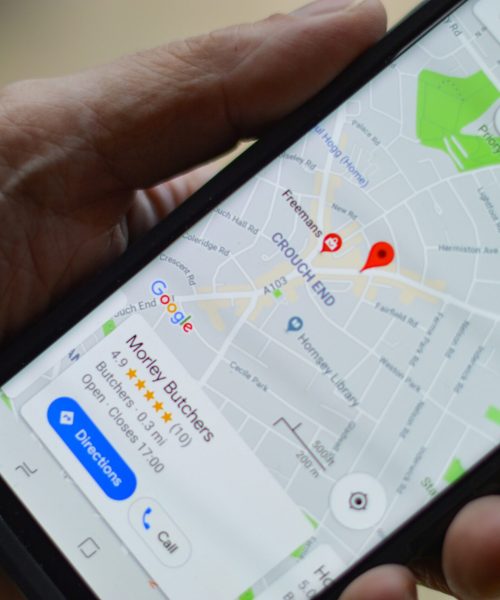
Your Google Business Profile (GBP) is one of the most important ranking factors in local SEO.
Google Business Profile Checklist:
- Claim and verify your listing at Google Business
- Ensure your business name, address, and phone number (NAP) are consistent
- Choose the most accurate business categories
- Add high-quality photos (interior, exterior, staff, products)
- Write a compelling business description using relevant keywords
2. Ensure NAP Consistency Across Directories
Your Name, Address, and Phone Number (NAP) should be the same across all platforms — from your website to Yelp, Facebook, and local directories.
3. Optimise Your Website for Local Keywords
Include location-based keywords in page titles, meta descriptions, headings, image alt text, and URLs. Add a dedicated location page for each area you serve.
4. Add Local Business Schema Markup
Schema markup is structured data that helps Google understand your business. Use LocalBusiness schema in JSON-LD format and validate with Google’s Rich Results Test.
Here’s an example
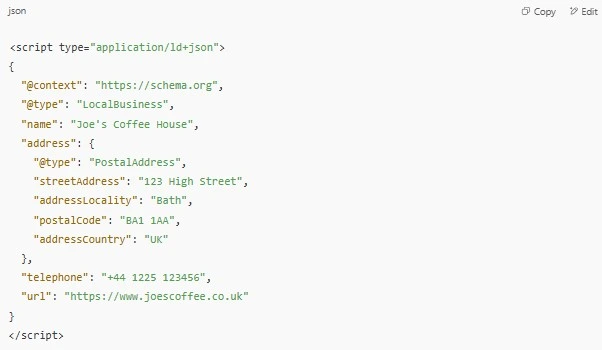
Use Google’s Rich Results Test to validate your markup.
5. Build Local Backlinks
Local backlinks from newspapers, blogs, directories, and business groups help build authority and trust.
6. Get More Online Reviews
Encourage satisfied customers to leave reviews. Add review links to emails, receipts, or thank-you pages. Respond to all reviews professionally.
7. Create Local Content
Write blogs or guides tailored to your region. Feature community involvement or local case studies to build relevance.
8. Track Your Performance
Use Google Search Console, Google Analytics, and GBP Insights to monitor local SEO metrics and keyword rankings.
Bonus: Local SEO Quick Wins
- Add internal links to location pages
- Embed Google Maps
- Use a local phone number
- Optimise for mobile and page speed
- Add opening hours and call tracking
Local SEO is ongoing and high-impact. Follow these steps to build trust, improve visibility, and attract more local customers to your business.
Want help with your local SEO?
Book a free audit or consultation — and let’s put your business on the map.